roundups
Best Ergonomic Keyboards of 2026 (Split, Tented, Mechanical)
Independent split + tented + mechanical ergonomic keyboard picks. Kinesis, ZSA Moonlander, Glove80, Keychron, and the budget tier compared.
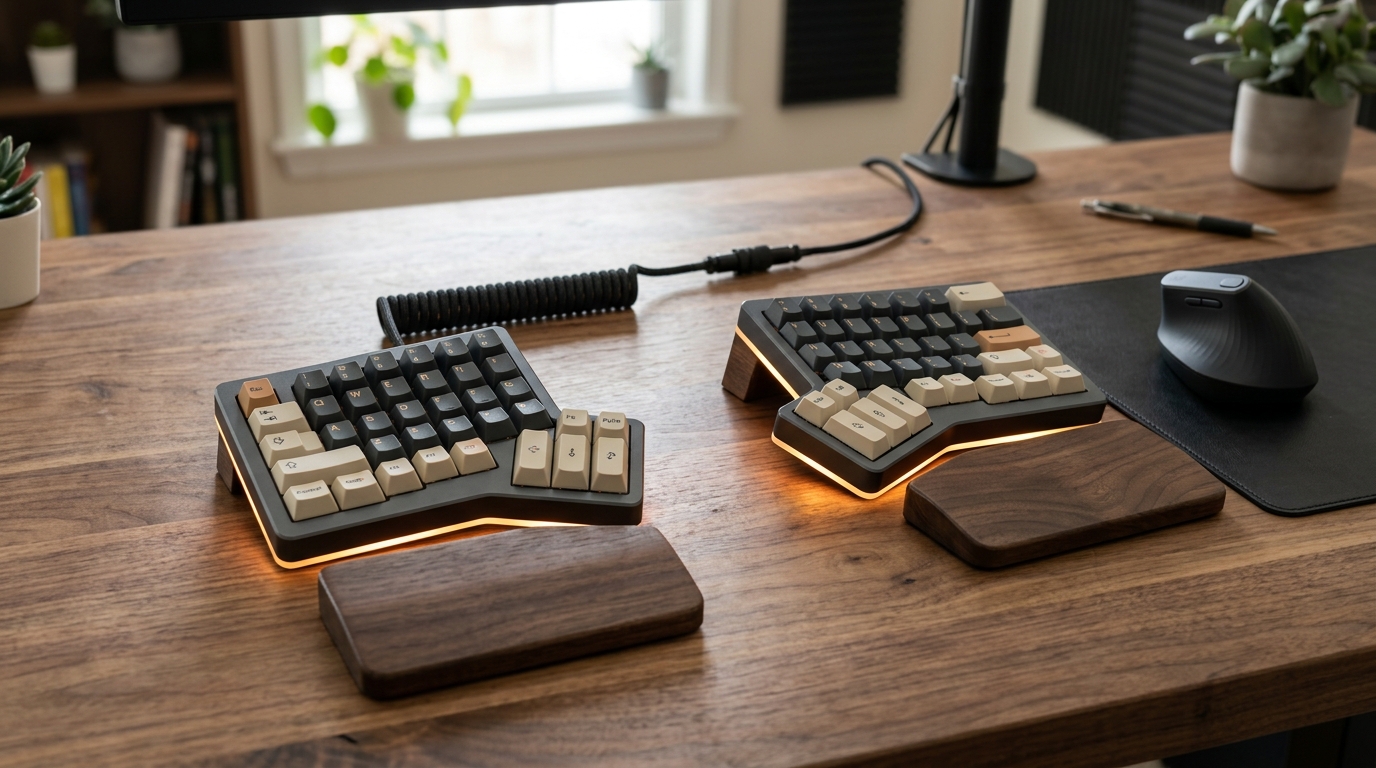
If your wrists ache after a day of typing, your keyboard is causing it. The standard keyboard layout forces your wrists into ulnar deviation (bent outward toward your pinky) — a position the median nerve does not like and the surrounding tendons resent. Split keyboards solve the deviation. Tented keyboards add neutral forearm rotation. Mechanical switches add typing precision that reduces force-per-keystroke. Pick all three and a decade of desk work gets meaningfully kinder to your hands.
This guide covers the genuinely-ergonomic keyboard category — split, tented, and ortho-linear designs at the $150-450 price point — plus the budget tier of “ergonomic-shaped” keyboards under $80 that are real product but make smaller wins.
How we picked
The ergonomic keyboard category has matured rapidly. The premium tier ($300-450) is dominated by three brands: Kinesis (the original), ZSA (Moonlander, the Voyager), and MoErgo (Glove80). Below them, a handful of legitimate competitors at $150-250.
- Genuine split, genuine tenting. A keyboard with the keys at a slight angle is not split. Real split means two physically separate halves connected by cable, with adjustable spacing and tenting. We don’t recommend “split-look” boards.
- Programmable firmware (QMK / ZMK / VIA). Lets you remap layers, set up thumb clusters, build macros. Without this, you can’t customize for hand size or shortcut frequency — and your hands work harder than they need to.
- Switch quality. Cherry MX, Kailh Box, Choc low-profile switches are all proven. Cheap proprietary switches die at year 2-3 and are not replaceable.
- Build quality past year three. Cables fray. Switches degrade. Hot-swap sockets fail. We weight reports from users past their second year.
- Available outside the keyboard rabbit hole. Some excellent ergonomic boards require ordering from one-person shops with 4-month lead times. We focus on boards you can actually buy.
Quick comparison
| Product | Best for | Rating | Notes | |
|---|---|---|---|---|
| Kinesis Advantage 360 (Pro) | concave key wells; the original ergonomic flagship | ★★★★★ | $450-540. Wireless or wired. Concave key wells. Steep learning curve. | Check price |
| ZSA Moonlander | flexible tenting + thumb clusters | ★★★★★ | $365. Split, tented, fully programmable. Excellent thumb clusters. | Check price |
| MoErgo Glove80 | best concave key wells available | ★★★★★ | $400. Choc low-profile switches. Wireless. Concave wells (like Kinesis). | Check price |
| ZSA Voyager | low-profile split for travel | ★★★★★ | $365. Slim profile, wired, fully programmable. | Check price |
| Keychron Q11 (split) | best budget split (not as deeply ergonomic) | ★★★★☆ | $220-280. Split row-staggered (less ergonomic than column-stagger). Heavy. | Check price |
| Microsoft Sculpt Ergonomic | fixed-split entry tier | ★★★★☆ | $80-110. Single-piece "ergonomic" curve. Real ergonomic improvement over flat. | Check price |
| Logitech Ergo K860 | similar to Sculpt; wireless multi-device | ★★★★☆ | $130. Curved, padded palm rest, multi-device pairing. | Check price |
The picks
Best overall: ZSA Moonlander
Best for serious typists ready to invest in ergonomic typing for the next decade
ZSA Moonlander Mark I
The Moonlander is the keyboard most ergonomic-keyboard enthusiasts recommend if you can only buy one. Genuinely split, genuinely tented (with included legs that adjust the angle), programmable firmware (QMK + a graphical configurator), and thumb clusters that hold the most-used keys (Enter, Space, Backspace) under your strongest fingers. The Cherry switch options are all proven. Build quality is excellent — these keyboards routinely show up in long-term reviews at year 5+ in original condition.
★★★★★ (2,100 reviews)
Check current price on Amazon →Pros
- Real split: two halves, adjustable spacing, no cable between you and the desk
- Tenting legs included; adjust from flat to ~30° tent angle
- Excellent thumb clusters: 4 keys per thumb cluster, full layer access
- QMK firmware via the Oryx configurator (web app; no command line needed)
- Hot-swap sockets — swap switches without soldering
- Available with multiple Cherry MX switch options
Cons
- Learning curve is real: expect 2-3 weeks of slower typing
- Wired only (the ZSA Voyager is the wireless-friendly option)
- Premium price ($365) — not a casual purchase
- No backlight on the standard model (Glow variant adds RGB)
- Thumb clusters require remapping shortcuts you've used for decades (Ctrl+C, Ctrl+V land elsewhere)
Best concave key wells: Kinesis Advantage 360
Best for users who want the deepest ergonomic key arrangement; serious RSI prevention
Kinesis Advantage360 Professional
The Kinesis Advantage line uses concave key wells instead of flat keyboard halves — each key is positioned along the natural arc of your finger travel rather than on a single plane. For users with existing wrist or finger pain, the Advantage often delivers more relief than a flat split. The trade-off is portability (these keyboards are large and shaped like nothing else) and an even steeper learning curve.
★★★★★ (840 reviews)
Check current price on Amazon →Best low-profile: ZSA Voyager
Best for travelers, ultrabook users, anyone preferring thin keys to mechanical
ZSA Voyager
The Voyager is the Moonlander's slimmer sibling — same split design and QMK firmware, but with Kailh Choc low-profile switches instead of full Cherry MX. The total profile is thin enough to throw in a laptop bag, and the typing feel is closer to a premium laptop keyboard than to a mechanical board. Excellent for users who don't love the chunky feel of mechanical.
★★★★★ (1,100 reviews)
Check current price on Amazon →Best wireless concave: MoErgo Glove80
Best for users who want Kinesis-style concave wells without the cable
MoErgo Glove80
The Glove80 brings concave key wells (Kinesis-style arched key arrangement) to a wireless package, with low-profile Choc switches instead of Cherry MX. ZMK firmware (the wireless equivalent of QMK) is fully programmable. For users who want both the deepest ergonomic shape and a clean desk without cables, this is the current best option.
★★★★★ (420 reviews)
Check current price on Amazon →Best budget: Microsoft Sculpt or Logitech Ergo K860
Best for users who want a real ergonomic improvement under $120, without learning a new layout
Microsoft Sculpt Ergonomic Keyboard
The Sculpt is a fixed-split keyboard — the two halves are permanently attached at a slight angle, with a dome shape that introduces light tenting. It's not as ergonomic as a real split, but it's a meaningful improvement over a flat keyboard, and it works with the standard QWERTY layout you already know. No firmware, no learning curve. The Logitech Ergo K860 is the equivalent at $130 with multi-device wireless.
★★★★☆ (5,400 reviews)
Check current price on Amazon →What to avoid
- “Ergonomic-shaped” gaming keyboards. Curved bezels, wrist rests, and RGB don’t make a keyboard ergonomic. If the keys are flat and the halves don’t separate, it’s a regular keyboard with marketing.
- One-piece “split-look” keyboards under $50. Keys angled inward in a fixed pattern. The angle is small enough that it doesn’t meaningfully change wrist position, and the build quality is uniformly poor.
- Sub-$80 mechanical keyboards marketed as ergonomic. A flat mechanical keyboard with PBT keycaps is a nice typing experience, but it’s not ergonomic in any meaningful sense. The mechanical part is unrelated to the ergonomic part.
What about layouts? (QWERTY vs Dvorak vs Colemak)
Splitting your keyboard and changing your layout are independent decisions. Most users who switch to split keyboards keep QWERTY. A subset (maybe 10-15%) then learn Dvorak or Colemak DH on top of the split — those layouts further reduce finger travel for English typing. If you’re going to learn one new thing, learn the split first; the layout question can come a year later when you’ve fully adapted.
FAQ
Frequently asked questions
Is the learning curve really 2-3 weeks?
Should I get a tented keyboard if I don't have wrist pain yet?
Split keyboard or wrist rest — which matters more?
Mechanical or membrane switches for ergonomics?
Wireless or wired ergonomic keyboard?
How do I justify $365-450 for a keyboard?
Bottom line
Best overall: ZSA Moonlander at $365. Best for deepest ergonomic shape: Kinesis Advantage 360 or MoErgo Glove80. Best low-profile / travel: ZSA Voyager. Best under $150: Microsoft Sculpt or Logitech Ergo K860.
Skip “split-look” budget keyboards under $50 and ergonomic-shaped gaming keyboards.
Round out the setup: chair, desk, mouse, or read the full setup guide.